Introduction
Are you using NotebookLM? And are you struggling because you want to feed a lot of documents into it, but all your important documents are locked inside Notion?
This kind of friction — connecting AI tools with external data sources — is a growing topic.
The Model Context Protocol (MCP) is getting attention as a standardized way to connect AI with external systems, but sometimes you just want to quickly get documents out of Notion and into NotebookLM, without the overhead of building a full MCP implementation.
I've been writing a lot in Notion for work and personal use over the past five years — it's become part of my external memory. But NotebookLM doesn't officially support Notion today, so feeding large numbers of documents into it is tedious.
With solving this problem as the main goal — plus wanting to try out vibe coding in practice — I built a simple Google Apps Script (GAS) tool.
The repository is public here: https://github.com/yamotty/notion-exporter-to-google-drive
What Does It Do?
This is a GAS project that automatically converts Notion database entries to Google Docs and exports them to a specified Google Drive folder. It runs as a combination of Google Spreadsheet and GAS.
Each entry in a Notion database is saved as an individual Google Docs document, preserving formatting and images (though some block types may not convert perfectly).
How to Use It
The README has full details. Here's a quick summary — it's a no-code tool usable through the following steps:
- In the settings sheet of a Google Sheet, configure your Notion database ID, Google Drive folder ID, and other settings.
- From the
Notion Exportmenu in Google Sheets, set your Notion API Key. It's stored in GAS properties. - Once set up, use
Debug: Export First Item Onlyfrom theNotion Exportmenu to test. It will process only the first item in the specified Notion database. Verify it's been saved correctly to Google Drive. Results appear in the "Debug Results" sheet. - For databases with many documents, use
Batch Export. Progress is written sequentially to the "Batch Status" sheet.
When complete, the documents should be generated as Docs in the specified folder. Images embedded in documents are collected into a dedicated images folder.
Loading Into NotebookLM
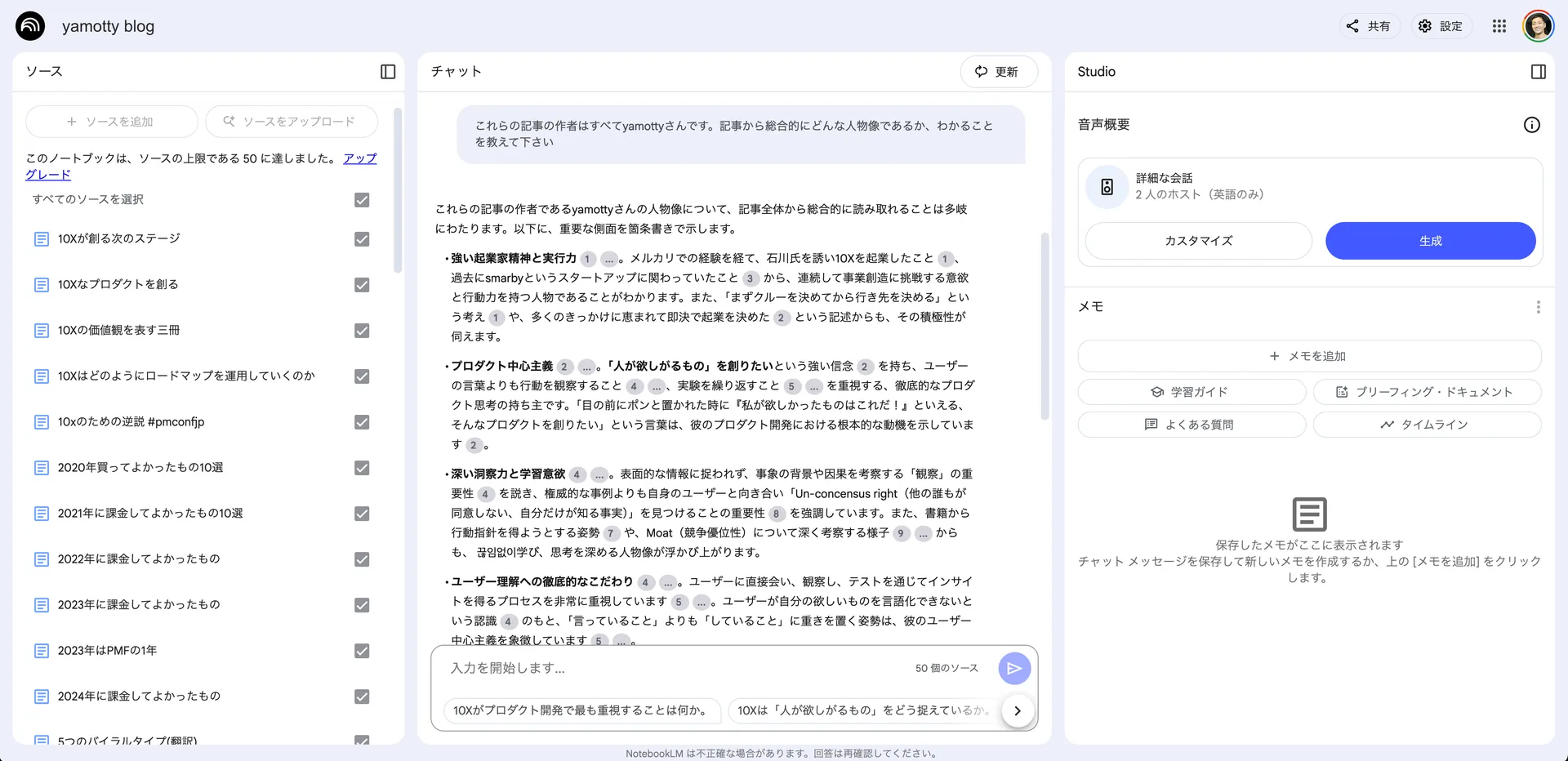
Since this blog uses Notion as a CMS, I exported my blog articles and loaded them into NotebookLM. My plan allows up to 50 sources, so I imported up to the limit. Here's what that looks like:



Comments
Share your thoughts or questions. Comments are published after approval.
Write a comment