Tools I Use Regularly
- Claude Advanced (Sonnet 3.5)
- Perplexity AI Pro (search)
- NotebookLM
- Notta (meeting transcription)
- Speak (English conversation)
Pretty standard stuff. I interact with ChatGPT and Gemini occasionally but surprisingly rarely reach for them.
Recently I've been watching Devin work inside the company.
I saw someone mention that using Devin while doing your own work in parallel is hard — and found myself nodding.
Proposing Specifications (Claude)
I sketch out what I want to build, who it's for, and rough user stories in bullet points, then ask Claude to propose specs. If the draft is good, I use it; if it's usable but needs work, I iterate; if it's off, I discard it quickly.
Claude's ability to pick up context is stronger than any other LLM I've used. If the initial prompt is good, it usually lands at "use as-is" or "needs light editing." If I throw in a vague "wouldn't it be nice to build something like this," it almost always lands at "discard."
Something I've noticed recently: now that the cost of turning an idea into a real thing has dropped significantly, my desire to build small personal products has approached zero. The first thought that arrives is "so what, what's the point?" The work I do at the company has strong forcing functions to build things that actually matter — and I find that more motivating.
Generating Demo Data (Claude)
I regularly create proposals and product demos, and I use Claude to generate realistic sample data for them. I pass in the table schema as a prompt and describe what the data should illustrate (e.g., "grows between X% and Y% per year"), and plausible sample data comes out.
It produces more natural-looking data than the clunky fake data I'd create manually.
Creating Structured Diagrams (Claude)
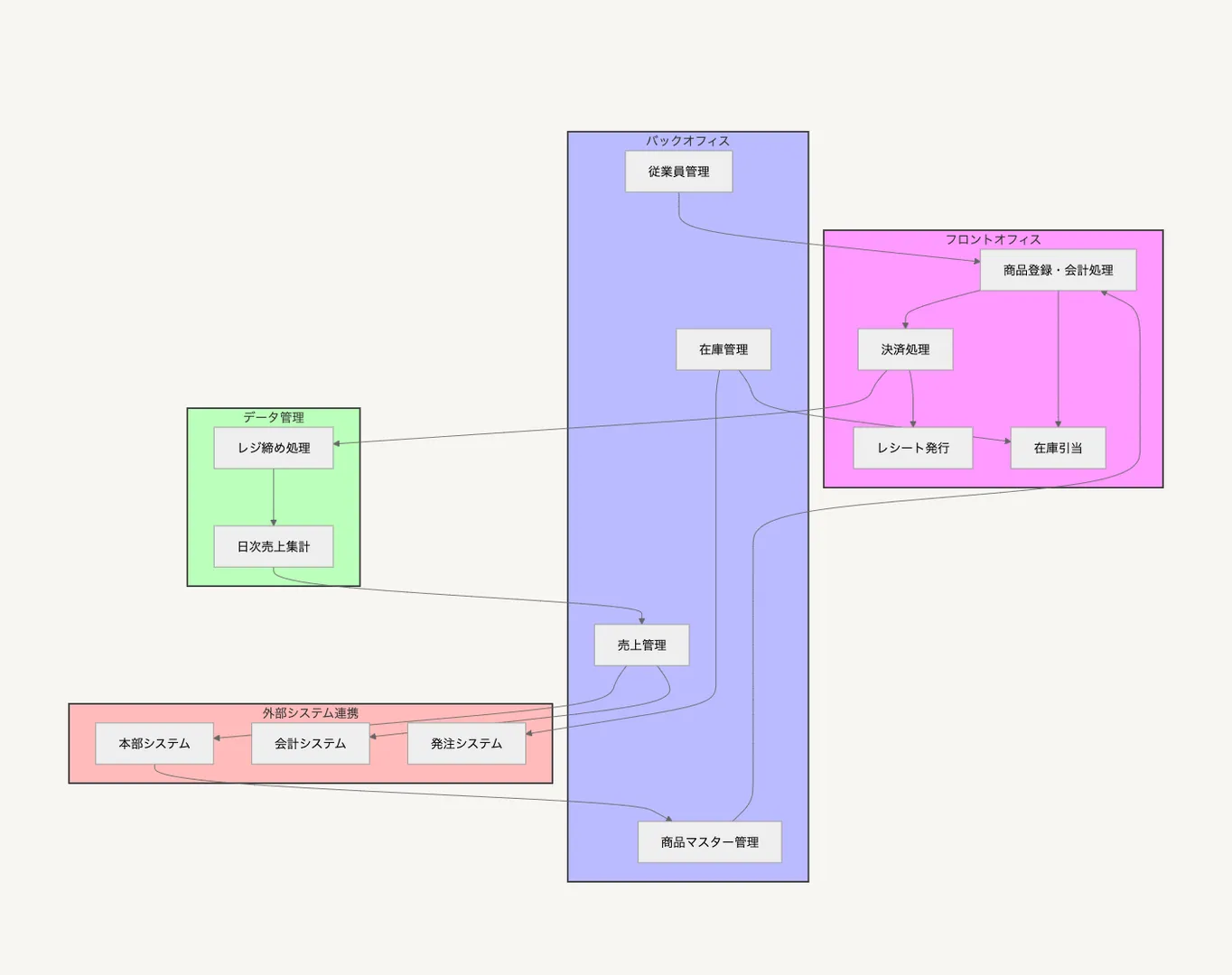
When writing documentation, there are often concepts better expressed visually — event streams, mind maps, relationship diagrams — than in text. I used to open Whimsical and click through everything. Now I paste bullet-point text into Claude and have it output Mermaid syntax. Embed that in Notion, and you have a diagram instantly.
Quality is borderline for external audiences, but great for organizing my own thinking. My impression is that Claude is still the best at generating simple programs like this. I also occasionally need SQL, Python, or Apps Script, and here too Claude feels highest quality to me.
Here's an example: Claude outputting the correlations between features in a POS system.
Market Research (Perplexity AI Pro)
Even for fairly niche products, Deep Research does a surprisingly thorough job. Perplexity's Deep Research seems slightly less speculative than ChatGPT's, but as "Deep Search" it's more than sufficient for my needs.
Sometimes "good enough" is exactly what you need.
Researching Investors and Customers (Perplexity AI Pro)
Similar use — Deep Research to dig into the track record and public statements of investors I'm about to meet, or to look up a customer's recent statements and their stance on digital transformation.
What I'm putting into Perplexity is really just the same search behavior I've always had — the location of the search has changed, not the behavior. The fact that it's become a real Google substitute is remarkable.
Loading Unfamiliar Materials and Asking Questions (NotebookLM)
When catching up on an internal domain I don't know well, I collect all the relevant materials from the people responsible, convert them to PDF, and load them into NotebookLM. What I've noticed doing this: if the original docs aren't well-written, what you pull out is equally mediocre.
I think my own materials are actually pretty AI-friendly by nature. I recently loaded in a Company Deck I made and had it generate a podcast — the content came out surprisingly well.
Writing Meeting Notes (Notta)
Notta lets you prompt-engineer the meeting note format. Here's roughly what I use:
Review the recording or transcript, identify the agenda items discussed. Then, for each agenda item, summarize the key discussion points and conclusions. Use the example as a reference, and write in Markdown with headings and bullet points for agenda, discussion points, and conclusions. Keep the language concise and clear, avoiding redundancy.
Meeting transcription apps — I've tried many. Honestly, the meetings where I think "I'm glad I transcribed that" are rare. More useful is sending Notta into a meeting I'm not attending and reading the summary afterward. It's the most "nice-to-have" item on this list.
English Conversation with Speak
Exactly what it says. I have an annual subscription and use the app to speak English. The original goal was practical — I wanted to do investor pitches and Q&A in my own words. Recently it's become more about pure learning motivation. I can feel my brain gradually adjusting as I repeatedly produce simple English phrases. That sense of progress keeps me going.
Other Things
Some tools I play with occasionally but don't use seriously:
- Building prototypes with a0.dev
- Phone recording → transcription with superwhisper


Comments
Share your thoughts or questions. Comments are published after approval.
Write a comment