I'm publishing the spec I wrote for the group sharing feature release in Tabery.
I decided to publish it because I thought it would give people a partial view into how products are built at 10X.
The thinking behind the spec
A spec document changes its role depending on the team's working style. Right now, 10X is a team where "prioritizing the mountain of challenges facing users and pushing the product forward as fast as possible" is the top priority.
So we emphasize "high-velocity communication face-to-face." No remote work.
In this environment, all discussion happens verbally. For example, I can have UI refinement discussions while sharing a screen with the person I made it with. That's the state we're in.
Given this, the spec's role is defined as follows:
- A design document with minimal "Why," "What," and "How" from value to user acquisition
- Stock information where the process and content of decisions can be traced concisely
- A document that satisfies these is sufficient. There's comfort in knowing that blank areas in implementation can be filled in verbally. "Perfect specs" are not the goal. Whether they're needed and what they look like should match the team — that's my basic thinking.
Group invite feature spec
What we want to achieve
Provide a means to support and replace communication within groups — especially families — the strongest community around cooking. The following conversations are the targets to replace:
- Sharing planned meals ("What's for dinner tonight?")
- Sharing shopping lists ("Can you pick up X on your way home?")
- Requesting meal suggestions ("Is there anything you want to eat?")
User flow overview
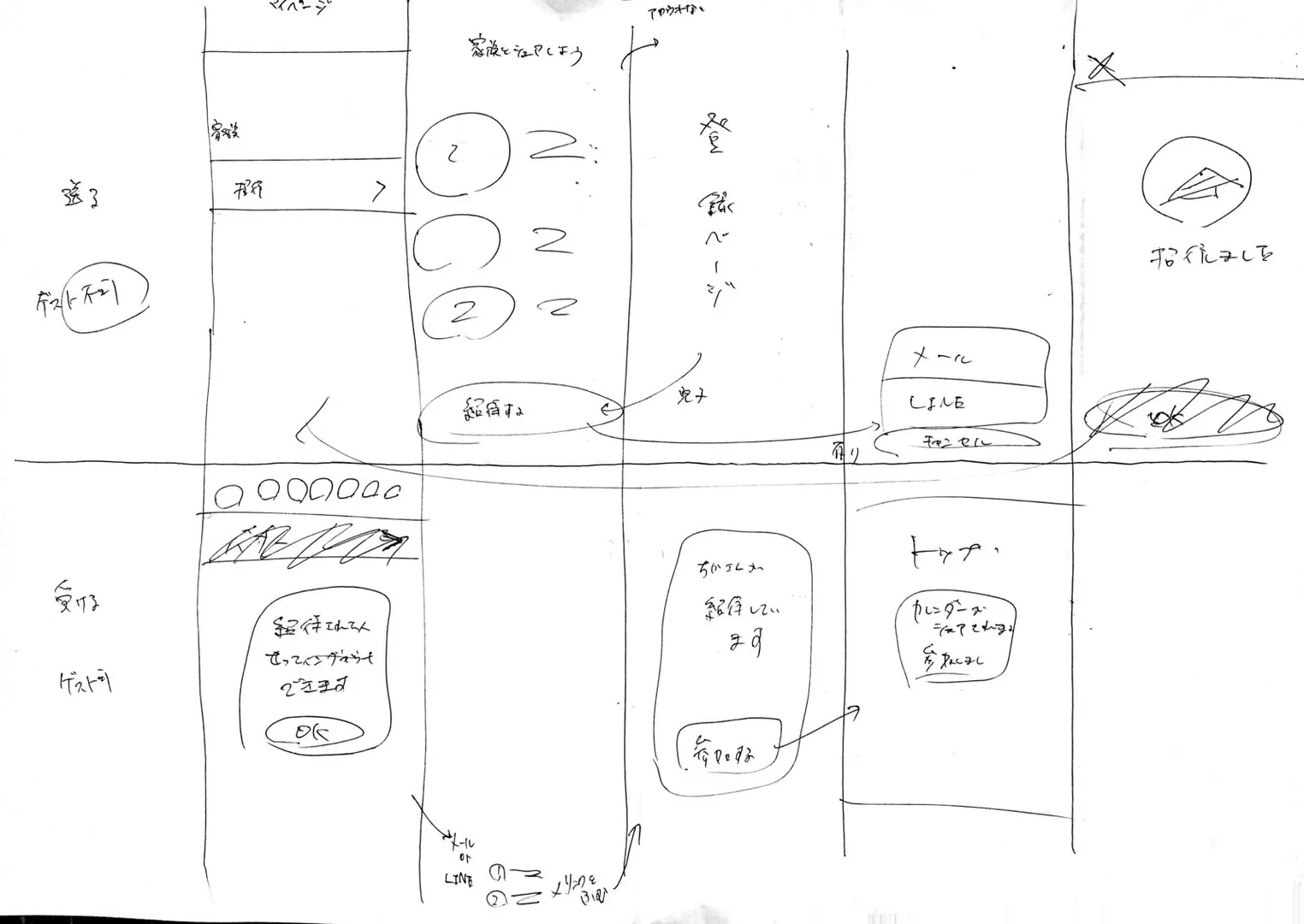
1 / Inviter — Must Login
The inviter must be a registered member.
- My Page > Invite to group
- Value proposition page > Invite (if unregistered user, go to registration → return to step 2 after completing)
- Share via share sheet (each invitation valid for 1 person, valid for 48 hours)
- Invitation complete page > X > Return to home
2 / Invitee — Guest Acceptable
Guests are fine.
- Download > Home > Get started
- First launch only: popup "If you were invited…" > OK
- Tap invitation link from email or LINE
- Modal "You've been invited by [name]" > Join
- Home > "Meal plan is being shared"
Overall UI concept
Below is the draft.
1 / My Page
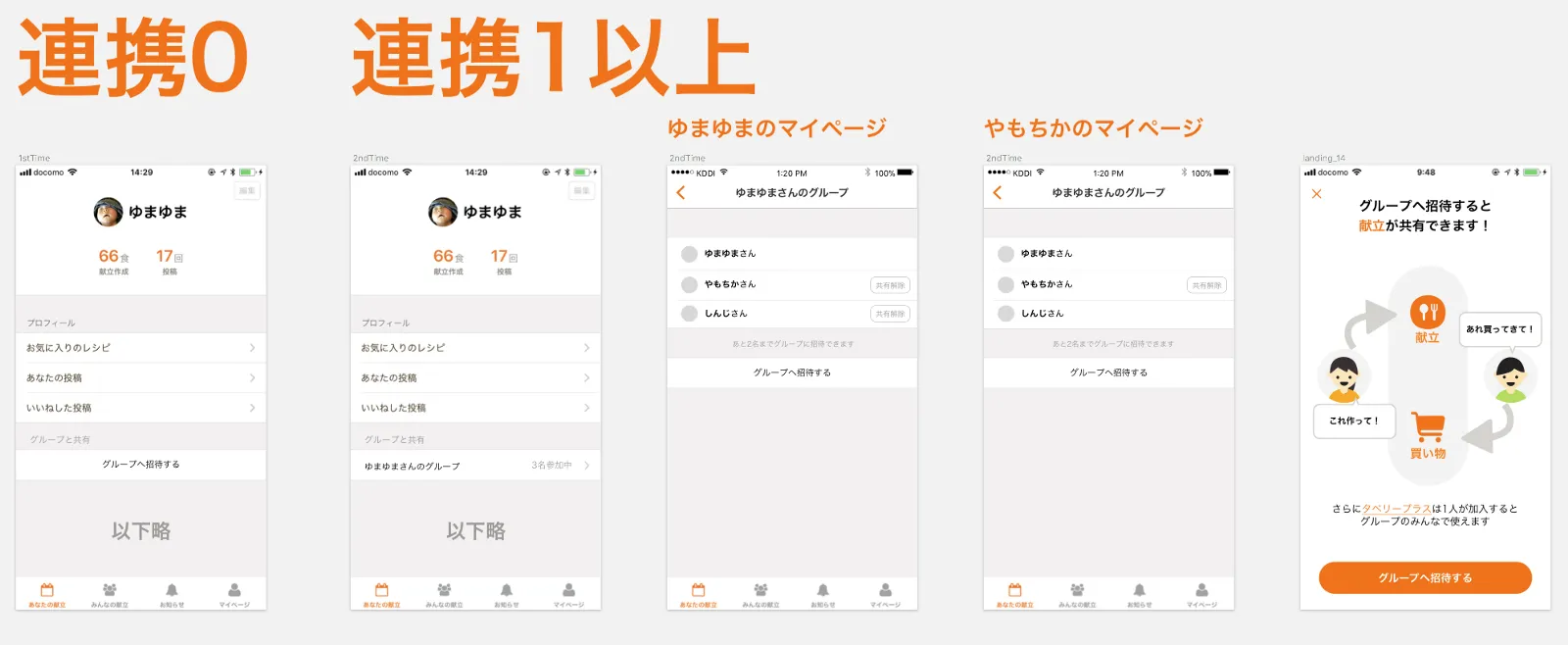
Common spec
- My Page UI changes as shown above before and after inviting.
- Anyone in the group can invite others to the group.
- The list page shows "You can invite X more people to the group." Maximum 5 including yourself.
- If group size reaches 5, the "Invite to group" button is not shown. Also change the text below the list to "Groups have a maximum of 5 people."
Removing sharing
- Only the owner can remove sharing for anyone other than themselves. Others can only remove themselves.
- When removing: show an alert "Are you sure you want to stop sharing with [User]?"
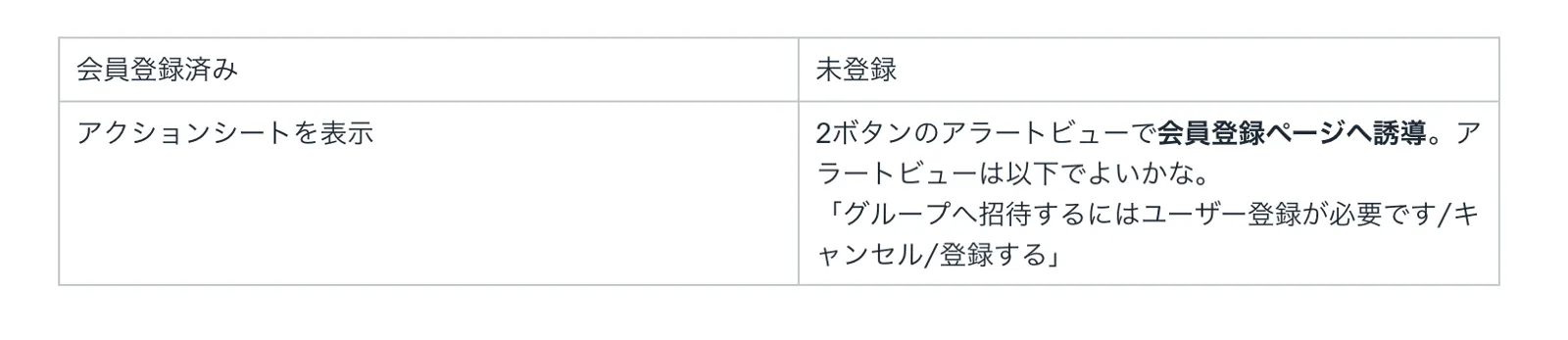
2 / Flow from value proposition page (LP) to invite
Invite flow
Value proposition page → After the "Invite to group" button, the flow branches by status.
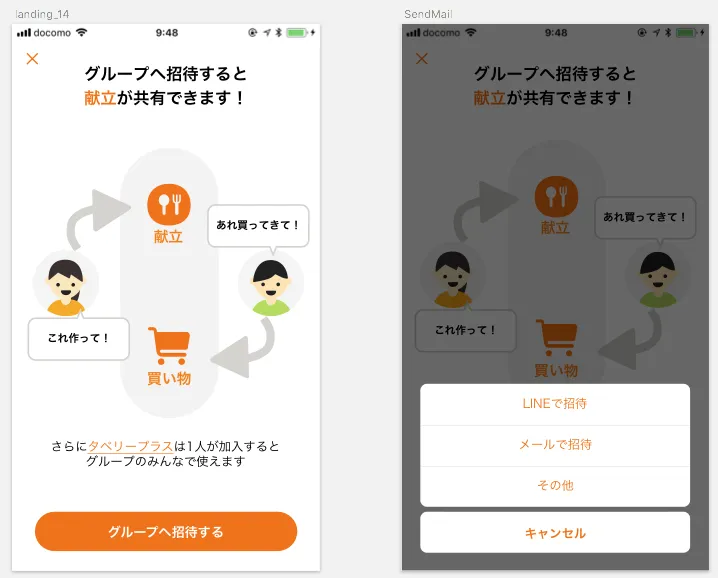
Appeal points
- Meal schedule can be shared
- Shopping list can be shared
- Share Tabery Plus
3 / Meal plan UI
- "Someone other than me created a meal plan" is communicated with notification
- Must handle 4 patterns generically: plan present/absent × paired/unpaired
- Must not give false impression that the recipe is "authored" by someone
These must all be satisfied simultaneously. The result:
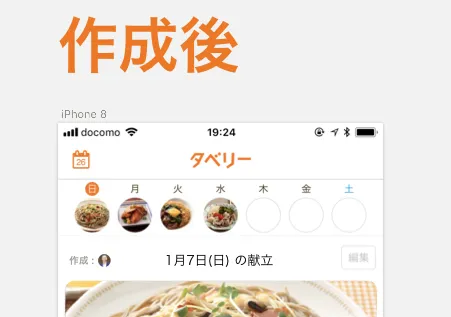
Show own icon? — YES
- Better to show when paired (icon present/absent) vs (icon always present, different content) is easier to recognize.
- Having the fact that you're using pairing visible at a glance is also good.
What when meal plan changes? — Show creator only
- Always show creator regardless of whether meal plan has changed.
- Because meal ownership is tied to the creator.
4 / Invitee flow spec
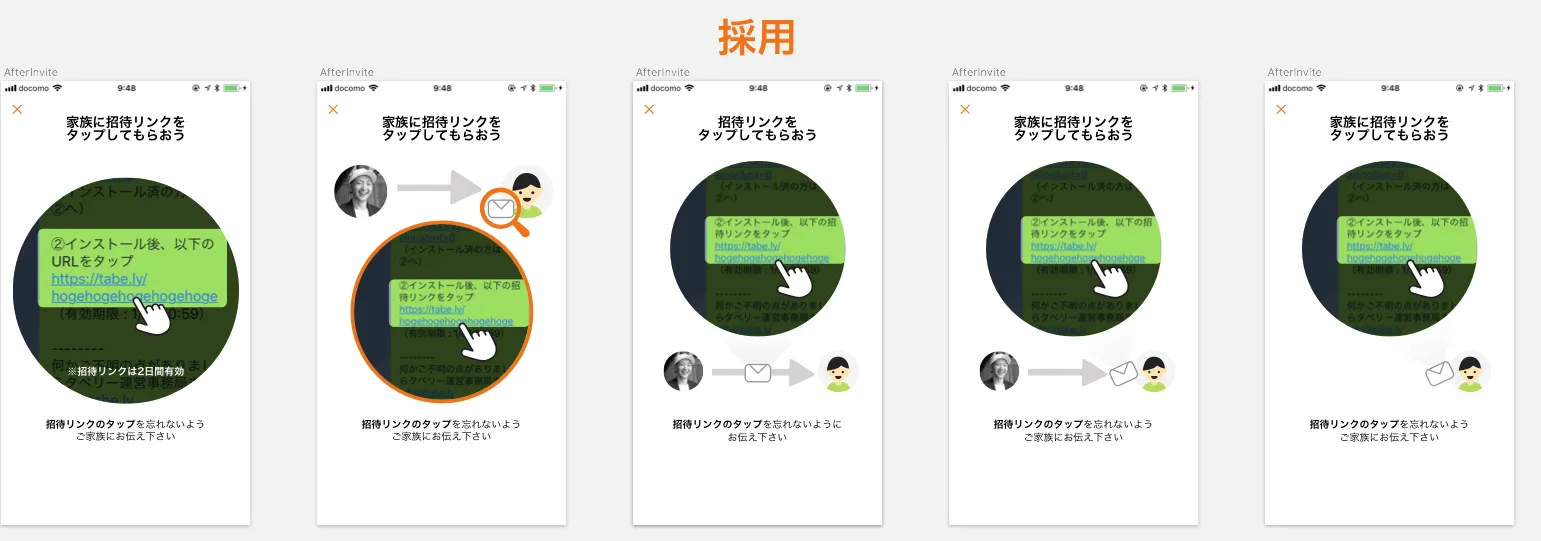
What the invite experience/UI must achieve
- The sharing method is safe over the medium to long term and does not steal mental overhead.
- Someone who installs after receiving an invitation understands what to do at first launch.
- Does not leave a negative experience for someone who wasn't invited at first launch.
Issue: forgetting to act
The invitee has 2 steps: "download app" + "tap link." There's a risk of forgetting the link tap and not knowing the next action. Solutions expressed in UI:
- Inviter tells invitee what to do after inviting (1. Download app, 2. Tap invite link).
- If pairing fails, invitee can get support from inviter.
5 / Email text
Should allow understanding the full process, take clear action, and be able to resolve confusion with an action if confused. Sample below:
You've been invited to meal planning app "Tabery." Sharing meals makes "I want to eat this" easy.
Share with "Yumajiro" in 2 steps!

① Install the app
https://tabe.ly/hogehoge (If already installed, go to ②)

② After installing, tap the invite link below
https://tabe.ly/hogehogehoge
(Expires: 1/31 10:59)

To receive the invitation, your app version must be 1.5.0 or higher.
For any questions, contact the Tabery team at info@tabe.ly
6 / Behavior after tapping invite link
Communicate group join consent and what becomes possible. Note that tapping users fall into 4 major patterns based on their status.
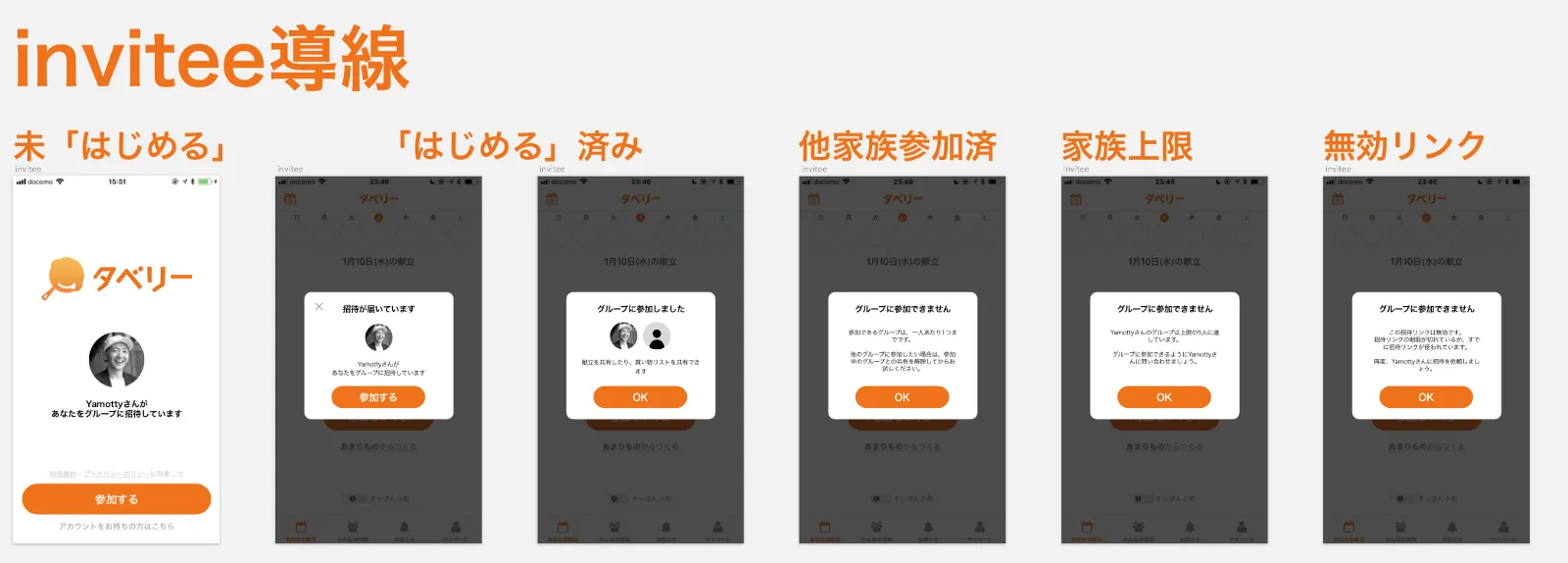
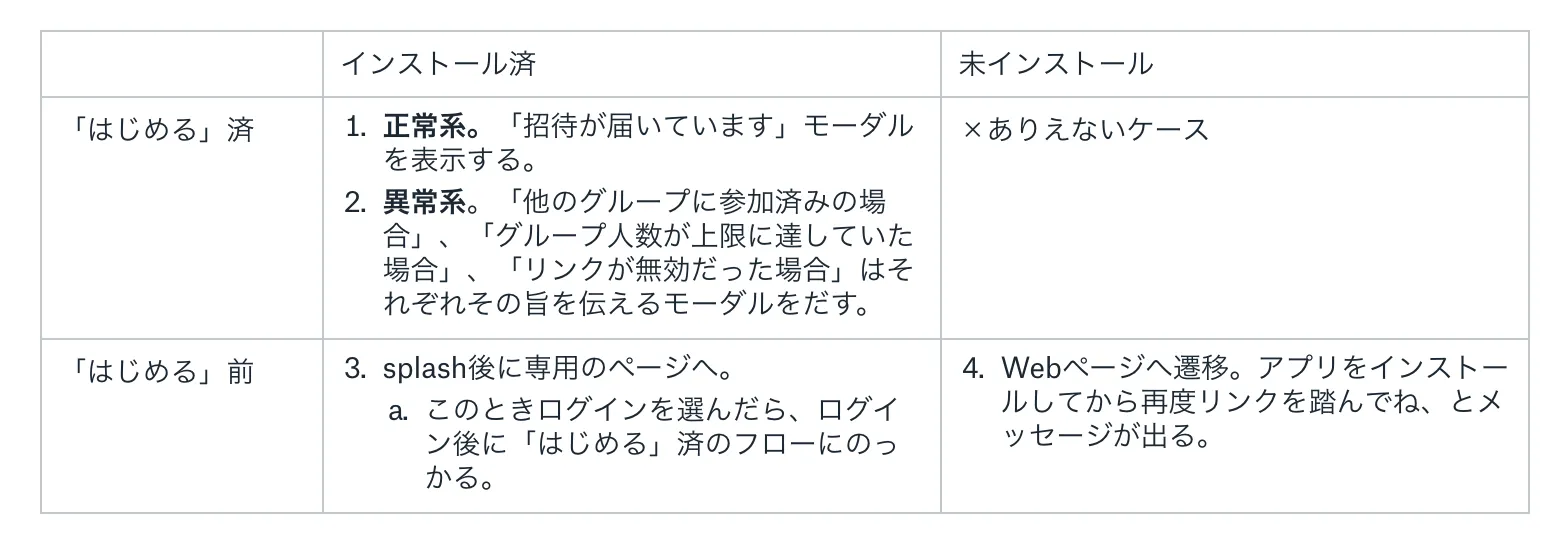
Edge case: "A Tabery Plus subscriber joins a group" — when to send what notification. When group pairing is complete, send notification to those in the above categories.
Notification recovery flow → backlog
Valuable notifications can be delivered when using this feature. Provide a flow to prompt notification permission for users who haven't allowed notifications in system settings. Excluded from initial release.
8 / Subscription sharing spec
- If any member of the group has Tabery Plus, everyone can use Tabery Plus.
- Modal shown when a Tabery Plus subscriber taps the value proposition link says "You're already subscribed."
See section 7 for notifications.
9 / Meal plans when group is dissolved
- A group shows all meal plans created by members of that group.
- When group is dissolved, only "meal plans you created yourself" are reflected in the calendar.
- Regardless of who edited.
10 / Version distribution
Users on versions before 1.5.0 cannot receive group invitations. Therefore a forced update is needed. To minimize forced update impact, proceed as follows:
Release 1.5.0 with the "Invite to group" path removed. When adoption exceeds 80%, release 1.5.1 with the path restored. Apply forced update, opening the feature in 1.5.1.
11 / Press release → cancelled because value can't be articulated
Issue a feature introduction + something extra release. Goal: user communication and policy recognition. But as-is it's not interesting. Need a hook.
→ I wrote a press release but it lacked punch so I stopped.
12 / Datastore spec
User Entity holds GroupId. Each user has exactly one unique ID. Group Entity is newly created. A GroupId with 2 or more UserIDs is a group where users are actually connected. Done. Normally KPI design would be incorporated, but currently that's handled verbally and through direct dashboard edits, so it's not in the spec.
(End)
A spec document is normally something that reflects a company's character and rarely gets published externally. But I believe "the spec itself has no value whatsoever."
The value is in the "process of inventing the product" — and that only reproduces because of the 10X team. So publishing the spec is fine if it gives people a glimpse of what our team is like. As I said, anyone who's curious about 10X's process and wants to see their capabilities tested in it — please apply here.
Note: Tabery closed in September 2020, and we are currently working on a product called Stailer — a B2B2C model product aimed at 10x-ing the retail experience.

Comments
Share your thoughts or questions. Comments are published after approval.
Write a comment